The CPaaS built for aggregators, not adapted for them
Developer-first, the way the global platforms are: one API for every channel, a webhook for every status, a log for every message, a rate card per channel. Then the layer none of them have: the pot. One prepaid balance that every brand you serve draws from, with one receipt, one invoice and one report.
Everything a developer-first CPaaS gives you, and the layer built for the aggregator
A global platform is built for one brand that sends. An aggregator resells to many brands and ends up running their balances, their rates and their month end in spreadsheets around the platform. Engage puts that layer inside the platform.
Developer-first, as any global platform
- One API for every channel: WhatsApp Business, SMS, RCS, email, voice AI agents
- A webhook for every status: accepted, sent, delivered, read, failed, inbound reply
- A log for every message, down to the charge the ledger made for it
- A rate card per channel and per account
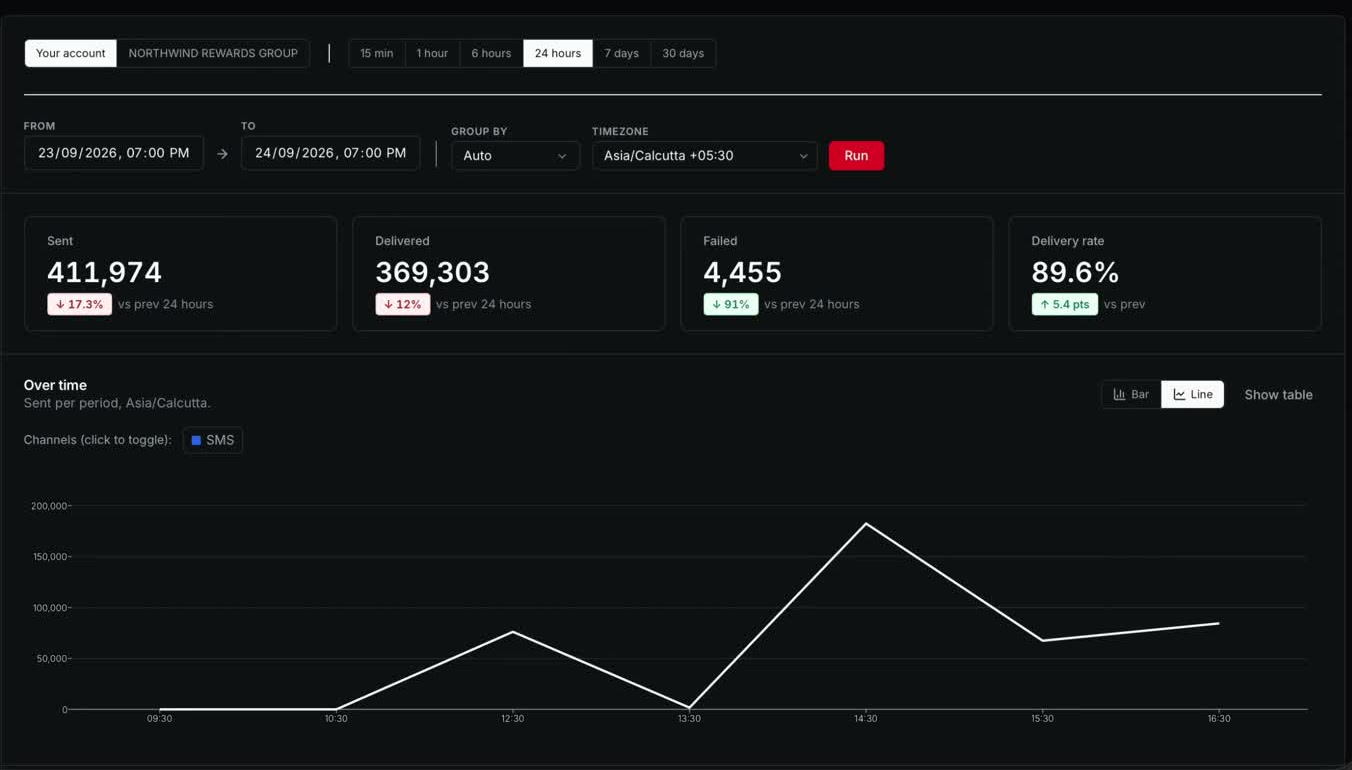
- Analytics for any period, by channel, in the customer's own time zone
- Sign in with a six digit code, and roles that decide who sees what
Built for the aggregator
- The pot: one prepaid balance that every brand you serve draws from
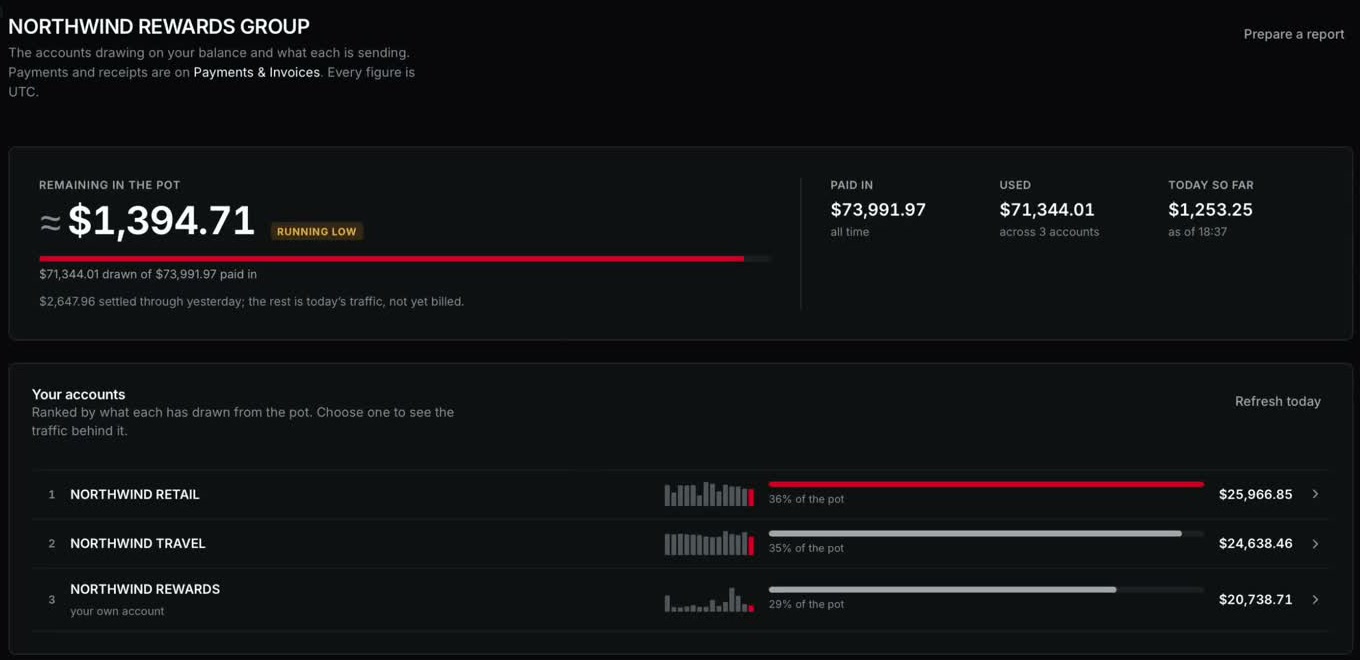
- Every brand ranked by what it drew, with a fortnight of traffic beside each name
- One payment, recorded once, with a numbered receipt, and one invoice on the pot, never on a brand
- One Excel report across all the brands or any few, read from the same ledger as the bill
- Each brand keeps its own account, users and rate card, and a pot leader sees them all
- A staff console for onboarding, channels, rates and payments, and our routing layer in front of the provider
The left column is table stakes and we meet it. The right column is why an aggregator moves: the pot, the ranking, the receipt, the one report. None of it is a workaround outside the platform.
One prepaid balance, drawn by every brand the aggregator serves
An aggregator pays in once. Each brand it serves sends from its own account, with its own users, its own rate card and its own traffic, and draws from the shared pot.
The console ranks the brands by what each one used, shows a fortnight of traffic beside every name, and prepares one report for all of them or any few. Each brand still sees its own consumption; nobody adds up separate statements at month end.
The rules that make this safe are in the schema, not in a procedure. A pot holds one currency, and an account in a different currency cannot join it by any route. A payment is recorded on the pot once. A brand inside a pot is never invoiced or alerted on its own; the pot is.

- Account
- The tenant and the unit of billing, one per brand
- Prepaid or postpaid
- Per account. The balance is reported and flagged, traffic is never blocked
- Currency
- Exactly one per account and per pot, enforced in the schema
- Rate card
- Per channel, per account
- Pot
- One balance for several accounts, the payment lands on the pot once
- Invoicing
- On the pot, never on a member brand
- Account manager
- One per pot, covering every brand in it
Five channels behind one account and one routing layer
A rate card per channel, one statement, one sign in.
- WhatsApp Business
- SMS
- RCS
- Voice AI agents
Our router moves traffic between providers without the customer changing anything
SaasQuirk is an official Infobip partner. Messages still run through our own routing layer before they reach the provider, so when a route has to change, we change it there. The brand's integration with us stays exactly as it was.
Voice AI agents are offered alongside the messaging channels, from the same team that runs them.
One call to send, a webhook for every status, a log of every message
A brand's developers write to one API whatever the channel. Each status the channel reports comes back on the brand's webhook, and the log keeps the full path of every message, down to the charge the ledger made for it.
{
"channel": "whatsapp",
"account": "northwind-retail",
"to": "+91 98xxx xx412",
"template": "order_shipped",
"params": { "order": "48213", "day": "Thursday" }
}{
"event": "message.delivered",
"message_id": "msg_01J9X4K7",
"channel": "whatsapp",
"account": "northwind-retail",
"at": "2026-10-28T09:41:09Z"
}- 09:41:07.212acceptedmsg_01J9X4K7 · whatsapp · northwind-retail · template order_shipped
- 09:41:07.230routedRoute chosen by our routing layer; the rate card for WhatsApp applied
- 09:41:07.618sentHanded to the provider; provider reference kept against the message
- 09:41:09.004deliveredWebhook posted to api.northwind.example, answered 200
- 09:43:51.110readWebhook posted, answered 200
- 00:00:00.000chargedNext morning: $0.0412 drawn from the shared balance, on the ledger line the invoice reads
Three billing rules and a receipt on every payment
Balances settle each day from what was actually sent. The console shows how many days the balance lasts at the current rate, and flags it when it is running low, before anyone has to ask.
Every payment carries a numbered receipt, kept. Three rules hold the ledger together, and each one was paid for.
- Bill on what was sent
- The sent count is the quantity that becomes money. What the provider charges us is a different question, and it never leaks into a customer's bill.
- Two clocks
- Sent settles when the UTC day closes. Delivered and failed keep moving for 48 hours. A priced day is never rewritten in full, but it takes the delivery updates.
- A report reads charged from the ledger
- Never sent multiplied by rate. A report that can disagree with the bill it explains is worse than no report.
- Numbering
- Per billing company and year
- Issued
- When a payment is recorded
- Kept
- In object storage
- Shown
- On every payment row in the console
Workbooks and analytics that read the same ledger as the bill
A customer asks for a workbook for any range up to a year and downloads it a minute later. Its figures come from the same ledger as the bill, so what a report says was charged is what was charged.
Analytics answers the operational question: how much was sent, delivered and failed, for any period, by channel, in the customer's own time zone.
- Sheets
- Dashboard with charts, then daily, weekly and monthly
- Whole pot
- Adds an accounts sheet and a tab per brand
- Range
- Any period up to a year, with presets for the last 30 days, last month, this month, this quarter
- Ready
- Within about a minute
- Kept
- Seven days, expired reports stay listed
- Provisional
- The last two days, while delivery reports still arrive

The console, screen by screen
Screens marked as image slots are being captured on demo data.
Payments and invoices
Reports
Analytics

Your accounts

The staff console
Provisioning, sessions, and who sees what
There is no demo password, and that is the point. An account manager creates the account; its owner finishes it through an emailed link and sets a password nobody else ever knows. Sign in asks for a six digit code; a trusted browser may be allowed to skip it.
Customer screens resolve the account from the session token and nothing else. No customer route accepts an account id, so there is no id to change.
- Customer finance
- Own account: balance, payments, receipts, reports
- Customer admin
- Own account: finance, traffic and performance
- Pot leader
- Every brand under the pot, their shares and traffic, one report for all or some
- Account manager (ours)
- Assigned accounts: onboarding, channels
- Finance (ours)
- Rates, payments, receipts, billing companies
- Root admin (ours)
- Every account, and the estate's exceptions
- Sign in
- Email and password, then a six digit code
- Trusted browsers
- Allowed to skip the code, revocable from the account screen
- Access token
- Held in memory only, never in local storage, never in a cookie
- Refresh
- Token rotation locked in the database
- Billing identity
- The console shows the billing company's own mark, so whose data is on screen is never a guess
Stack, runtime and the daily schedule
The ledger runs on schedule every day. The engineers who built it run it, with a runbook that goes from symptom to action and a written record of what went wrong before.
- Backend
- Java 25, Spring Boot 4.1
- Database
- PostgreSQL 16, 27 Flyway migrations
- Cache and sessions
- Redis 7
- Tests
- 494, run against a real PostgreSQL and Redis through Testcontainers
- Console
- SvelteKit 2, Svelte 5, Tailwind 4, TypeScript strict, a static app on S3 and CloudFront
- Region
- AWS Mumbai
- Scheduled jobs
- Usage fetched 02:15 UTC, closed days priced 03:15 UTC
- Storage
- Receipts kept, reports kept seven days
A walkthrough, written rates, then the accounts
- 01
A walkthrough
Twenty minutes in the console, on demo data, around the number of brands you serve and the channels they use.
- 02
Rates for the channels in use
Written, per channel, per brand.
- 03
Accounts set up by our team
Each person then sets their own password through an emailed link. Nobody else ever knows it.
Questions aggregators ask
- What is Engage?
- Engage is the CPaaS built for aggregators. It carries WhatsApp, SMS, RCS, email and voice AI agents on one account, and an aggregator runs every brand it serves, and its whole account with us, from one console.
- How is Engage different from a developer-first CPaaS?
- A developer-first CPaaS gives one company an API and a balance. Engage adds the layer an aggregator needs on top: an account per brand, one shared prepaid pot every brand draws from, a rate card per channel and per brand, receipts and reports from the same ledger as the bill, and roles for the aggregator and for each brand.
- What is the pot?
- One prepaid balance that every brand under the aggregator draws from. Each brand sends from its own account; its usage is priced daily against the pot. The console ranks the brands by what each has drawn, shows a fortnight of traffic beside every name, and flags the pot when it runs low.
- How is usage priced?
- Every closed day is priced the next morning from what was actually sent, per account and per channel, at the brand's rate card. Delivery and failure counts keep updating for 48 hours without rewriting the priced day, and every report reads the charged amount from the ledger, never sent multiplied by rate.
- Which channels and which network?
- WhatsApp through the WhatsApp Business Platform, SMS, RCS, email, and voice AI agents that answer and place calls. Traffic is carried through our official partner Infobip, with our own routing layer in front of the network, so a route change never reaches a brand.
- Where does Engage run, and where is the data?
- Engage runs on AWS in Mumbai, and data is stored on servers in India. Usage is fetched and priced on a daily schedule, receipts are kept, and the engineers who built the platform are the ones who run it.
- How do we start?
- A twenty minute walkthrough of the console on demo data, around the number of brands you serve and the channels they use. Then written rates per channel and per brand, and accounts set up by our team.

See the console on demo data
Tell us how many brands you serve and which channels they use. We will set up the walkthrough around that.
Or write to support@saasquirk.com. SAASQUIRK LLP, India.